The pay-once [CleanShot X] alternative
CleanShot X is a polished, mature capture app for the Mac. Kapshot does the same everyday job, recording and beautiful screenshots, as a native, on-device app you pay for once. Here is an honest look at where each one wins.
- One-time $19
- No subscription
- No account
- On-device
Updated August 2026·7 min read
CleanShot X earned its reputation. It is fast, well-designed, and has spent years polishing annotation, scrolling capture, and a hosted cloud. If you want the most feature-complete Mac capture suite and do not mind paying every year, it is a great choice. This page is not here to pretend otherwise.
Kapshot takes a narrower, sharper position. It does two things and weights them equally: it records your screen with cursor-following auto-zoom and one-click system plus microphone audio, and it wraps screenshots in beautiful backgrounds, real macOS window frames, and soft shadows. It is native, it runs entirely on your Mac, and you buy it once. If that is the shape of your work, Kapshot is faster to reach for and cheaper to own.
The core difference is how you pay and where your captures live
CleanShot X is sold as a subscription, and it is also available through Setapp. Either way, you keep paying for as long as you use it, and the price is tied to a renewal. That funds continuous development, which is a fair model. It is just a different deal from owning the tool.
Kapshot is a one-time purchase of $19 at launch, then $29. There is no account, no renewal, and no login. The app runs on macOS 26 and later, and every capture stays on your machine. CleanShot offers an optional cloud that uploads a capture and hands you a shareable link. Kapshot does not, by design, because it keeps everything on-device. That is the honest trade: you give up an instant hosted link to keep your captures private and local.
How to read this comparison
Feature-by-feature, side by side
Here is a fair table. Kapshot leads in native recording, auto-zoom, and pay-once ownership. CleanShot X leads in annotation depth, scrolling capture, and its optional cloud. Both take excellent screenshots and both let you frame them nicely.
| Feature | Kapshot | CleanShot X |
|---|---|---|
| Pricing model | One-time purchase | Subscription / Setapp |
| Screenshots with backgrounds and frames | ||
| Real macOS window chrome and shadows | ||
| Screen recording | ||
| Cursor-following auto-zoom | ||
| One-click system plus mic audio | Mic, plus setup for system audio | |
| Deep annotation and markup | Basic | |
| Scrolling capture for long pages | ||
| Optional cloud with shareable links | ||
| Fully on-device, nothing uploaded | Optional cloud | |
| Account required | ||
| Runs natively on macOS |
Read that table without spin: if annotation, scrolling capture, or a hosted link are central to your day, CleanShot X is the stronger tool and worth its subscription. If you mostly capture, frame, and record, and you would rather own the app outright, Kapshot wins on price and on the auto-zoom recording that CleanShot does not offer.
Where CleanShot X is genuinely stronger
A comparison that only flatters one side is not worth reading. These are the areas where CleanShot X is the better pick today, and where Kapshot deliberately does less.
Annotation and markup
CleanShot X has a mature annotation layer: arrows, step counters, highlights, blur for sensitive text, and precise editing after the shot. If your captures are mostly annotated bug reports, tutorials, or design feedback, that toolset is a real reason to stay. Kapshot keeps annotation basic on purpose and spends its polish on framing and recording instead.
Scrolling capture
CleanShot can stitch a long, scrolling page into one tall image. That is genuinely useful for capturing an entire webpage or a long document, and Kapshot does not do it. If scrolling capture is part of your routine, keep CleanShot for that job.
The optional cloud and instant links
CleanShot's cloud uploads a capture and gives you a short shareable link in seconds, with a history of what you have shared. For teams that live on quick share links, that is a real convenience. Kapshot stays on-device and has no cloud, so you share the file yourself. Whether that is a downside or the whole point depends on how much you value privacy over a hosted URL.
Where Kapshot pulls ahead
- Cursor-following auto-zoom is automatic while you record, so a plain screen grab looks like an edited product demo with no timeline and no keyframes. CleanShot records cleanly but does not do this.
- System audio and microphone are captured together in one click, natively. On macOS the built-in Shift-Command-5 toolbar and QuickTime record the mic only, so people install a virtual audio device like BlackHole to get system sound. Kapshot removes that setup.
- Screenshots are beautiful by default: a clean background, a real macOS window frame, and a soft shadow, ready to drop into a slide, a landing page, or a changelog.
- You pay once. No renewal, no account, no login, and nothing leaves your Mac. When a subscription lapses you keep working exactly as before.
An honest positioning
See the recording and the framing
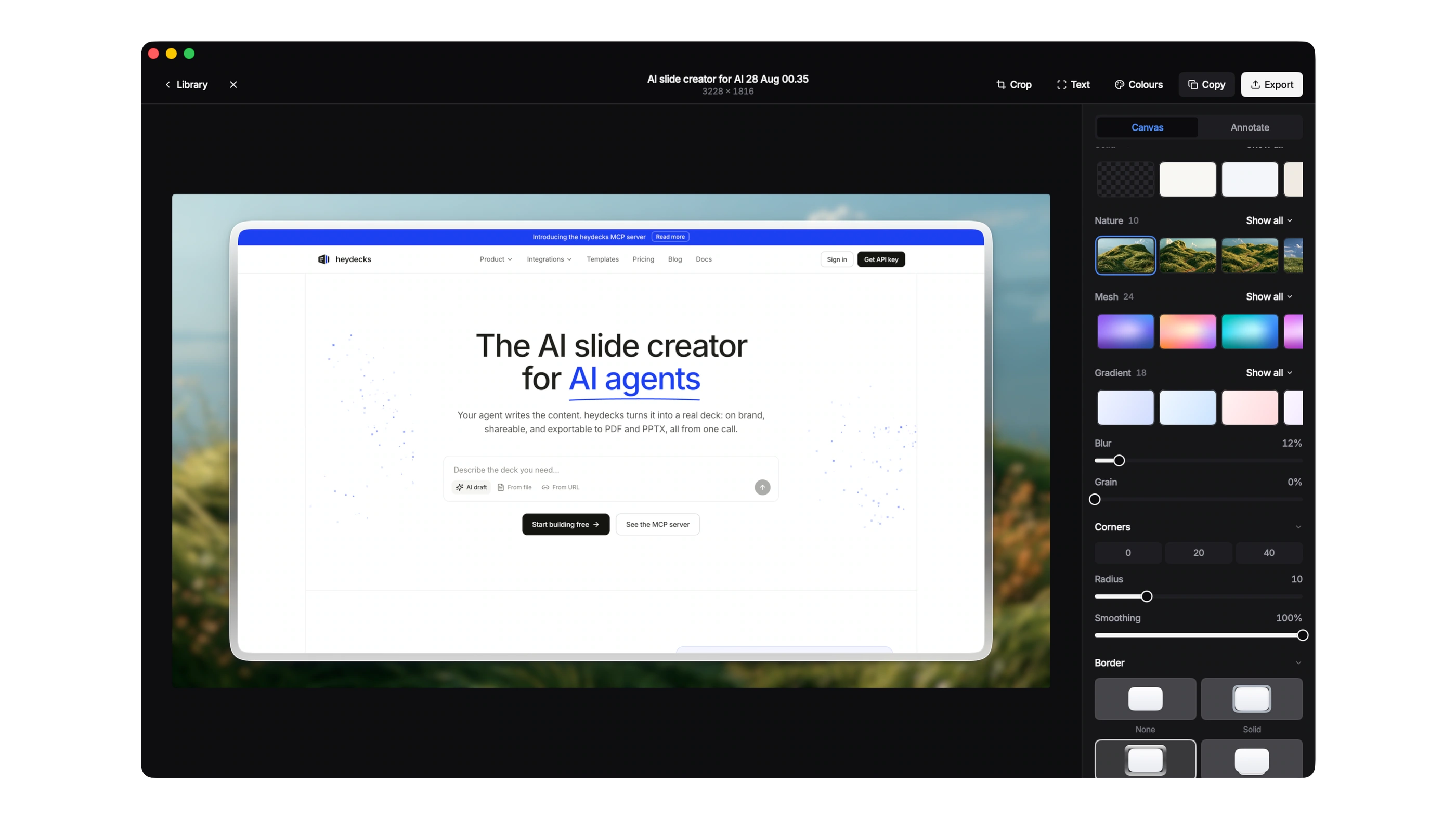
This is a real Kapshot recording. Watch the zoom ease toward the cursor on its own, the motion that usually takes a manual edit in other tools. Below it, the same screenshot raw and then beautified, framed the way Kapshot exports it.

Who should pick which
Choose CleanShot X if you annotate heavily, capture long scrolling pages, or live on instant cloud share links, and a subscription is fine for tools you rely on. Choose Kapshot if you want native auto-zoom recording, one-click audio, and screenshots that look designed, all in an on-device app you buy once and keep. Plenty of people even keep both: CleanShot for annotation, Kapshot for polished recordings and framed shots.
CleanShot X alternative FAQ
One app for [both] jobs
The two things most captures need, done natively on your Mac and paid for once.
Record with audio
Capture a window, a region, or the full screen with system and mic sound in one click.
Auto-zoom
Recordings follow your cursor and ease into the action, no timeline and no keyframes.
Beautiful shots
Wrap every screenshot in a clean backdrop, a real window frame, and a soft shadow.
Own your capture tool [once.]
Native auto-zoom recording and screenshot beautifying, on-device, for a single $19 payment instead of a subscription.
Or try the free 7 day trial. No account, no subscription.